
Skip to content

RegumWeb Software

Released

Regum Browser

A Windows browser with built-in filtering, flexible tabs and optional AI assistance.

Regum Browser is a desktop web browser for Windows 10 and Windows 11 on x64 PCs. It includes the Electron and Chromium runtime in the installer; no separate Node.js or Microsoft Edge WebView2 installation is required.

Download installer

Windows 10/11 x64 Version 1.0.0 100.20 MiB

Regum Browser — A Windows browser with built-in filtering, flexible tabs and optional AI assistance.

About the application

A Windows browser with built-in filtering, flexible tabs and optional AI assistance.

Organise browsing with horizontal or vertical tabs, pinned tabs, groups, split view and saved sessions. Search local history, bookmarks and open tabs from the address bar. Regum Shield combines network and cosmetic filtering with site controls, popup filtering and optional filter lists. Its YouTube treatment depends on the website and cannot guarantee uninterrupted playback or complete ad removal. Private windows use a separate temporary browsing session; they do not provide anonymity.

Optional AI conversations and page summaries require separate provider setup and may incur provider charges. Browser actions remain subject to tab sharing, permission limits and approval. The optional local RegumAI connection is off by default and shares only individually selected normal tabs. RegumAI requires its separate Regum Browser connector and provider setup. Check connector and provider compatibility before starting automated tasks. Page content and AI output can be misleading.

Updates are installed manually. Chrome extension installation, browser sync, a password manager and Safe Browsing reputation checks are not included. Some streaming services, DRM-protected media and hardware features may not work as expected.

Official, unmodified releases of Regum Browser are free to download, install and use for personal and commercial purposes. No Browser purchase or subscription is required. The source code remains proprietary; modification, redistribution and other rights are not granted by this licence. Optional third-party services retain their own terms, account requirements and charges. Third-party components retain their own licences. Contact maitkonts@regumweb.com for other arrangements.

Made for your workflow

What you can do.

  • Horizontal or vertical tabs, pinning and tab groups
  • Split view, reopen closed tabs and saved sessions
  • Address-bar search across history, bookmarks and open tabs
  • Regum Shield network and cosmetic filtering with per-site controls
  • Popup filtering and optional filter lists
  • Separate temporary browsing sessions for private windows
  • History, bookmarks, downloads and find in page
  • Themes, interface text scaling and background tab sleeping
  • Optional AI conversations, page summaries and approval-controlled actions
  • Opt-in local RegumAI connection with explicit normal-tab sharing
  • Clear browsing data, clear on exit and site permission prompts
  • Windows x64 installer with the browser runtime included
  • Free personal and commercial use of official releases; proprietary source

Release notes

Version 1.0.0

Version 1.0.0 brings flexible tabs, split view, Regum Shield filtering, private windows and optional AI assistance. The RegumAI connection is off by default and uses explicit tab sharing, reviewed actions and operation receipts. This build updates the browser runtime and filtering dependencies to Electron 44.10.0 and RE2JS 2.8.7, alongside fixes for download protection, address-bar behaviour, tab/session recovery, cancellation, find in page and narrow or high-contrast settings layouts. Updates remain manual. Official unmodified releases are free for personal and commercial use; the source remains proprietary. Optional third-party providers retain their own terms and charges.

Keep exploring

More from RegumWeb.

All software
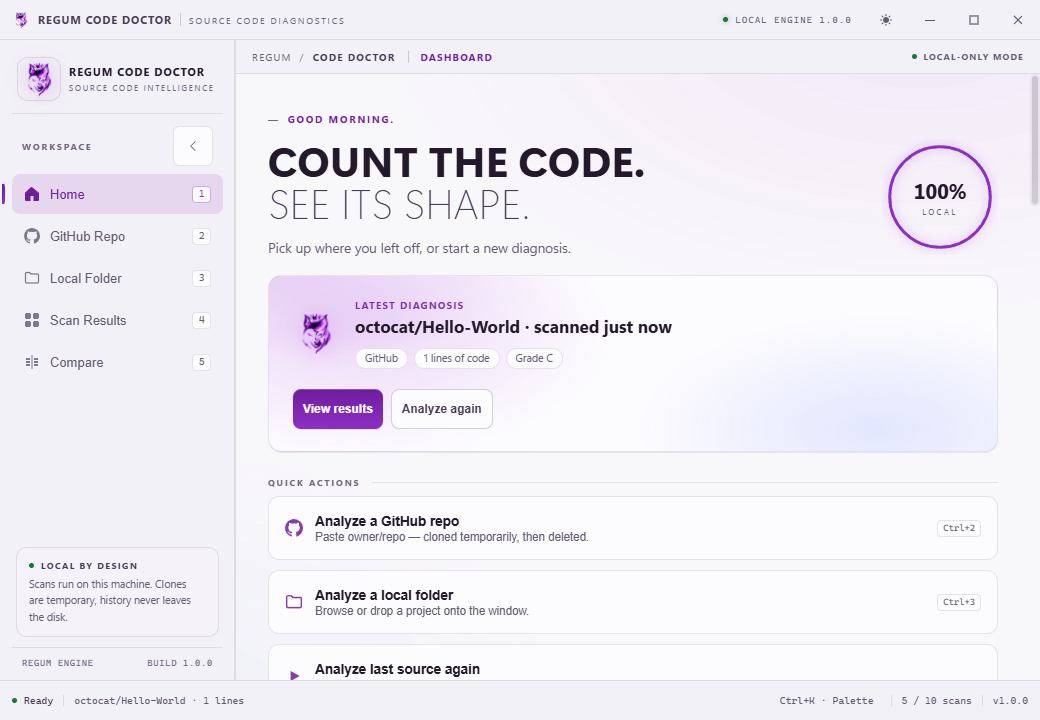
Regum Code Doctor
Released

Regum Code Doctor

Understand your codebase. Keep analysis on your PC.

Analyze a local project folder or public GitHub repository to understand its languages, code and comment lines, TODOs, file sizes and changes over time. Review a heuristic health score, compare saved scans and export reports without uploading your source.

  • Analyze local folders and public GitHub repositories, with dependency, generated-file and custom exclusion filters.
  • Explore languages, code and comment lines, TODO markers, folders and largest files.
  • Review a 0–100 code health score and practical recommendations.
Platforms
Windows 11 · x64
Release date
07.10.2026
Download installer

Version 1.0.0 4.34 MiB

Installer checksum

Verify published checksums before installing.

SHA-256: c15544ca3d630be3d9a28dfe5256efe241a1ab6fc4fbaae0611afd4e5787cdc8

Release notes
Regum Code Doctor 1.0.0 was rebuilt and published on regumweb.com on 29 October 2026. The Windows x64 application, uninstaller and both installer formats are signed by RegumWeb OÜ and include trusted Microsoft timestamps. The application version remains 1.0.0. This build includes the reviewed parser, Unicode, PowerShell, scan/cache, history recovery, comparison, export and keyboard-navigation corrections. Close Regum Code Doctor before installing. The EXE installs for the current user; MSI is available separately for managed installation. Verified platform: Windows 11 x64. Clean Windows 10/MSI lifecycle and manual screen-reader/mixed-DPI checks remain unverified. WebView2 may be downloaded during installation. No RegumAI automation connector is included.

Regum Media Player
Released

Regum Media Player

Local media playback. Preview build; playback decoder required.

Regum Media Player is a Windows x64 preview for playing local video and audio. A compatible libmpv playback DLL must be supplied separately: this installer contains no decoder and does not download one. Review the playback-engine requirements below before installing.

  • Open local video and audio files, use drag and drop, or play the media directly inside a selected folder.
  • Manage queue order and selection, with search, bulk actions, undo and redo.
  • Use playback controls, seek, speed and volume settings, and the audio/subtitle tracks reported by your supplied decoder.
Platforms
Windows · x64
Release date
28.10.2026
Download installer

Version 1.0.0 5.27 MiB

Installer checksum

Verify published checksums before installing.

SHA-256: ed9359492640f8c7aa9af7799efba70b1032b4678babeb495c2d56e371baabe1

Release notes
Regum Media Player 1.0.0 is offered as a decoder-free Windows x64 preview. Supply a trusted compatible libmpv client API 2.x DLL separately; ENGINE.txt explains setup. No decoder is bundled or downloaded automatically. This build adds the optional RegumAI connection, with separate permissions, exact change review in the player, and persistent operation receipts. The connection is off by default. Improvements include pause/seek confirmation, stale-request rejection, interrupted-command recovery, Unicode labels and small-window review layout. Save your work and close the player before installing an update. The application profile and source media remain separate from the installed program. Private session skips automatic playback history; an explicitly approved bookmark still stores the reviewed media path. A broad format matrix and full hardware, audio-device, Narrator and clean-machine qualification remain open. Signing verifies the publisher and file integrity; it does not establish those acceptance results.
Regum Music
Released

Regum Music

Your music. No subscription. Your control.

Regum Music is a free local music player for Windows 10 and 11 x64. Bring together the songs already on your computer, find the next track quickly, and listen offline without an account or subscription. Your audio stays in its own folders.

  • Play MP3, FLAC, WAV, Ogg Vorbis, AAC/M4A and AIFF files from your own library.
  • Browse songs, albums, artists, genres and folders; search, rate tracks and save favourites.
  • Edit song, album and artist details inside the library, with corrections preserved through rescans.
Platforms
Windows 10 / 11 · x64
Release date
22.10.2026
Download installer

Version 1.0.0 10.36 MiB

Installer checksum

Verify published checksums before installing.

SHA-256: 7d1c8f091298c615107205454f3571d51a393c6b8f5e9adbebdeb5c9bb6542dc

Release notes
Regum Music 1.0.0 is now publicly available as a Windows x64 installer signed by RegumWeb OÜ. Freeware for personal and business use. This release includes automatic missing-file cleanup, song/album/artist metadata editing, playlist and queue improvements, and playback fixes. Close Regum Music and connected AI clients before upgrading, and back up your existing profile. The installer preserves your library, playlists and settings; uninstalling preserves the profile too. Supported audio formats are MP3, FLAC, PCM WAV, Ogg Vorbis, AAC/M4A and AIFF. DRM-protected audio is not supported. Online downloads and optional third-party AI connections require their own setup and network access.